Makera Carvera Air Desktop CNC Review: Who It Fits and Who Should Skip It
As an Amazon Associate we earn from qualifying purchases. Links on this page are affiliate links.
This makera carvera carvera air desktop cnc review examines a compact milling solution for small spaces. The Carvera Air is an enclosed desktop CNC machine designed for hobbyists and small workshops. It offers a working area of 11.8" x 7.9" x 5.1". The unit maintains a small footprint of 19.7" x 17.7" x 17.7". It targets makers who need precision without industrial bulk. The machine supports various materials and includes software. This review focuses on its technical capabilities and fit for your workspace.
What stands out
- Enclosed design reduces noise and contains chips
- Quick tool changer switches bits in 10 seconds
- Spindle runout is less than 0.0004in for high precision
- Auto probing and surface leveling calibrate uneven materials
Who it fits
Good fit for
This machine suits hobbyists and small workshop owners who need a quiet, contained environment. The enclosed footprint fits well on desks or in maker spaces. Users who value precision for PCB milling or detailed engraving will appreciate the auto-probing and low spindle runout. The quick tool changer benefits those running multi-step projects. It is ideal for those who want professional accuracy in a compact desktop form factor.
Who should skip it
You should look elsewhere if you require large-scale industrial production. The 11.8" x 7.9" x 5.1" work area limits part size significantly. If you need to machine large sheets of wood or metal, this desktop unit is too small. The enclosed design may also restrict access for very large or unusual fixtures. Users needing a full-size gantry mill will find this workspace too restrictive for their primary projects.
Verdict: The Makera Carvera Air is a precise, compact CNC mill ideal for detailed work in small spaces. It fits users who prioritize accuracy and noise reduction over large part capacity.
Key specs explained
Working Area: 11.8" x 7.9" x 5.1"
This defines the maximum volume of material you can machine in a single setup. You can fit boards or blocks within these dimensions. For drill presses, this replaces the table size. Larger work areas allow bigger projects without repositioning. This size suits detailed parts and small assemblies. Compare this footprint against larger industrial mills if you need heavy stock removal.
Spindle runout < 0.0004in
Runout measures how much the rotating spindle wobbles off-center. Less wobble means cleaner cuts and better tool life. This precision is critical for small end mills and drill bits. High runout causes vibration and poor surface finish. This spec ensures accuracy comparable to professional benchtop mills. Check this when buying precision tools for tight tolerances.
Motor resolution 0.0002in
This value indicates the smallest distance the motors move per step. Higher resolution allows finer control over tool position. You get smoother edges and more accurate hole placement. This matters for detailed engraving or precise drilling. Compare this to lower resolution machines that may skip steps. It supports detailed work that standard benchtop equipment might struggle to match.
Enclosed footprint: 19.7" x 17.7" x 17.7"
These dimensions describe the machine's external size including the safety cover. The enclosure contains chips and reduces noise. It fits on standard workbenches or desks. This compact design suits home workshops with limited space. Open-frame machines take up more floor area. Consider this footprint when planning your shop layout for safety and convenience.
Design and build overview
The Carvera Air presents a compact, fully enclosed footprint measuring 19.7" x 17.7" x 17.7". This design choice helps reduce noise, contain chips and dust, and improve safety for home workshops. The listing notes a silver finish on the Carvera Air Standard model. You can place this unit on desktops, maker spaces, labs, and small studios without taking up excessive room. The enclosed structure is practical for keeping your workspace clean during detailed machining tasks.
Inside the enclosure, you get a working area of 11.8" x 7.9" x 5.1". This defines the maximum volume of material you can machine in a single setup. The machine includes a quick tool changing system that allows you to switch milling bits in just 10 seconds. This feature speeds up workflows for jobs requiring multiple tools, such as engraving, drilling, and cutting in a single project. You spend less time setting up and more time creating.
According to the listing, the Carvera Air is available in four variations. These include the standard version and options with a 4th Axis PCB Kit, a 4th Axis Kit, or a 4th Axis Add-on Kit. The package includes an accessory kit, tool kit, material kit, instruction manual, and examples guide. This comprehensive inclusion means you have the necessary hardware to start machining immediately after unboxing. The build quality focuses on precision, with spindle runout under 0.0004in and motor resolution at 0.0002in. These specs ensure industrial-level accuracy for prototypes, custom parts, and detailed engraving.
Setup and everyday use guide
Setting up the Carvera Air involves unpacking the standard 3-axis machine, accessory kit, tool kit, and material kit. The enclosed design simplifies placement in small workshops or on desks. You connect the unit via Wi-Fi or USB. The included Makera CAM software runs on MacOS and Windows. You can also use the Makera Controller app on iOS, Android, MacOS, Windows, or Linux. The system integrates with Fusion360, SolidWorks, and VCarve Pro. This allows you to prepare designs in familiar CAD environments before sending them to the machine. Daily use benefits from the quick tool changer. You can switch milling bits in just 10 seconds. This feature supports projects requiring multiple tools, such as engraving, drilling, and cutting in one session. The automatic probing and surface leveling system calibrates your workpiece automatically. This ensures accurate cuts even if the material surface is uneven. The spindle runout is less than 0.0004 inches, and motor resolution is 0.0002 inches. These specs imply high precision for detailed work. You can machine hardwoods, softwoods, MDF, acrylic, carbon fiber, aluminum, and brass. The 11.8" x 7.9" x 5.1" work area defines the maximum volume for each setup. You fit materials within these dimensions for milling or carving. The compact footprint of 19.7" x 17.7" x 17.7" keeps the machine stable during operation. Noise reduction and dust containment are built into the enclosure. This makes it suitable for home environments where clean operation matters. You spend less time on setup and more time on creation.
Before you buy the Carvera Air
You should verify that your workspace can handle the 19.7" x 17.7" x 17.7" footprint. The enclosed design helps contain dust, but you still need a stable surface. Check your material compatibility. The machine handles aluminum, brass, hardwoods, and acrylic, but you must ensure your bits are sharp for metals. You will need to source your own cutting tools and raw stock. The package includes a tool kit and material kit, but consumables are not listed. Verify software access. You need a computer running Windows or MacOS for Makera CAM, or a mobile device for the controller app. Integration with Fusion360 and SolidWorks is available, so confirm your existing files export correctly. This machine sits apart from standard drill presses. It is a milling center, not a drilling station. If you need precise 3D carving or PCB milling, this fits. If you only drill holes, look at benchtop drill presses instead. Consider the 4th axis add-on if you plan complex rotary work. It is an optional upgrade for specialized projects.
Check before you buy
- Confirm your desk or bench can support the machine weight and size.
- Check if your computer runs Windows or MacOS for CAM software.
- Verify you have appropriate end mills for your target materials like aluminum.
- Ensure you have space for the enclosed footprint and dust collection.
- Decide if you need the optional 4th axis for rotary projects.
The product at a glance
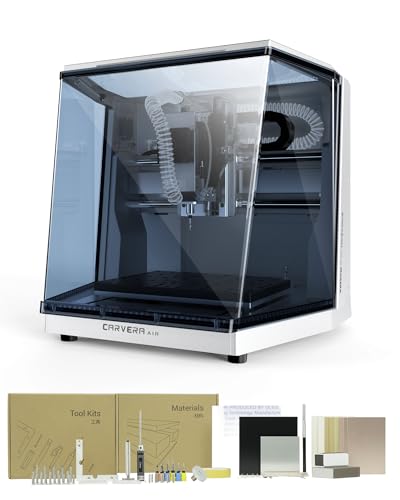
Makera Carvera Air Enclosed Desktop CNC
Best for: Small precision machining and prototyping
- Working Area
- 11.8" x 7.9" x 5.1"
- Target Material
- Metal, Wood
View on Amazon: Makera Carvera Air Enclosed Desktop CNC Affiliate link
The Makera Carvera Air is a fully enclosed desktop CNC with a 11.8" x 7.9" x 5.1" work area. It features a quick tool changer that swaps bits in 10 seconds. Auto probing and leveling ensure industrial-level accuracy. You get Wi-Fi or USB connectivity and support for major CAD/CAM software. This compact machine suits hobbyists and small workshops needing precision on materials like aluminum, wood, and acrylic.
Pros
- 11.8" x 7.9" x 5.1" work area
- Quick tool changer switches bits in 10 seconds
- Auto probing and surface leveling for accuracy
- Spindle runout under 0.0004in
- Compatible with Fusion360 and VCarve Pro
Cons
- Smaller work area limits large project sizes
- Standard version lacks 4th axis capability
- No built-in dust extraction port listed
Good fit if
- You need precise machining for small prototypes
- You want quick tool changes for multi-step jobs
- You work in a home office or lab
Skip if
- You require a large work area for big parts
- You need a 4th axis for rotary work
- You want a machine with built-in dust collection
Verdict: The Makera Carvera Air Desktop CNC is a precise, compact solution for small-scale machining. It fits makers who value accuracy and quick setup over large workspace capacity.
Specifications side by side
| Spec | Makera Carvera Air Enclosed Desktop CNC |
|---|---|
| Working Area | 11.8" x 7.9" x 5.1" |
| Target Material | Metal, Wood |
| Size | Carvera Air Standard |
| Color | Silver |
| Model | CA1 |
Frequently asked questions
Is the Makera Carvera Air good for beginners?
Yes, it suits makers who value accuracy and quick setup over large workspace capacity. The enclosed design simplifies placement in small workshops or on desks. You connect the unit via Wi-Fi or USB, making the initial configuration straightforward for new users.
What materials can the Carvera Air machine?
The machine handles aluminum, brass, hardwoods, and other compatible materials. Its compact footprint allows you to work with smaller blocks or boards within the 11.8" x 7.9" x 5.1" working area. This makes it ideal for small precision machining tasks and prototyping.
How large is the Carvera Air's footprint?
The unit has a compact, fully enclosed footprint measuring 19.7" x 17.7" x 17.7". This design helps reduce noise and contain chips. You should verify that your workspace can handle these dimensions before placing it on a desk or workbench.
Does the Carvera Air come with accessories?
Yes, setting up the standard 3-axis machine involves unpacking an accessory kit, tool kit, and material kit. The included Makera software and connection options help you start machining quickly. This all-in-one approach reduces the need for separate purchases.
Is the Carvera Air suitable for metalworking?
It is designed for small precision machining, which includes metals like aluminum and brass. The precise, compact solution fits makers who prioritize accuracy. While it handles metals, the limited workspace means you are best suited for small-scale parts rather than large panels.
What is the working area of this CNC?
The Carvera Air offers a working area of 11.8" x 7.9" x 5.1". This defines the maximum volume of material you can machine in a single setup. You can fit boards or blocks within these dimensions, which replaces the table size concept found in drill presses.
Who should skip the Makera Carvera Air?
You should skip it if you need a large workspace capacity. This machine is a precise, compact solution for small-scale machining. It fits makers who value accuracy and quick setup. If you require a larger bed for big projects, this unit is not the right fit.